

Everyone can pretty much relate to having a great photo ruined by something unsightly in the background and wonder how it would make such a huge difference if you could just remove it. Well, you’re in luck because we will be giving you a simplified guide on how to clean up pictures online, and the best part? It’s totally free! Instantly remove unwanted objects and tidy up the overall look of your photos just with this powerful AI tool. Some might overlook the impact a clean looking photo brings, in fact it is often the first thing users notice. In this article, we will discover the best AI tool to clean up your pictures in no time!
1.Introducing The Best Tool to Clean Up Pictures – insMind
Introducing the most competitive AI tool in the market, insMind! insMind offers a wide variety of editing features users absolutely love. insMind is a powerful AI tool tailored to all your AI photo editing needs. One of its best and famous features is the ability to clean up pictures with ease. Using insMind’s powerful AI technology, users can erase unwanted objects instantly with just a few clicks. With insMind cleaning up your picture, this gives your photo a free from distractions, ensuring your images look their absolute best. Whether you’re a professional or just a straight up beginner in photo editing, insMind has simplified their features to better tailor your needs. You don’t have to be a professional editor to make your photos polished and presentable, insMind will be here to help you out!
2.How to Clean up Pictures
Cleaning up your pictures is easy with the help of insMind. With these steps, you won’t ever have to worry about unwanted objects ever again!
Here is a step by step guide on how clean up your photos and remove unwanted objects:
Step 1. Visit the insMind Website
Access insMind by going to their website and opening it in your preferred web browser. If you already have an account, sign in with your credentials. Otherwise, create a new account which allows you to access all features for free.
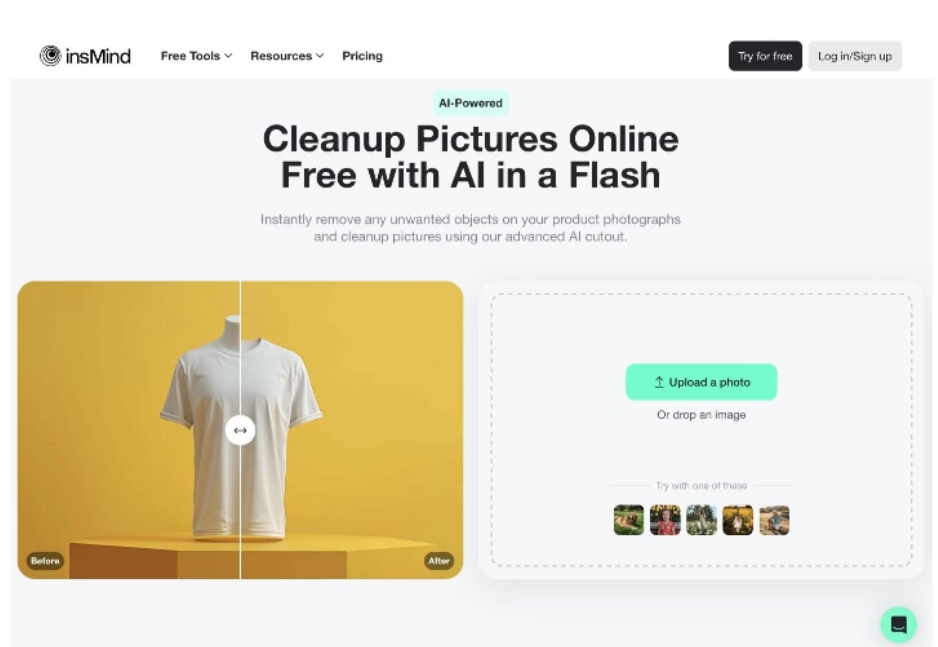
Step 2. Upload Your Photo
Once you have successfully navigated to insMind’s website, you will be able to see this interface. Click on the “Upload your photo” button and choose the photo you wish to clean up.
Step 3. Brush Over Unwanted Objects
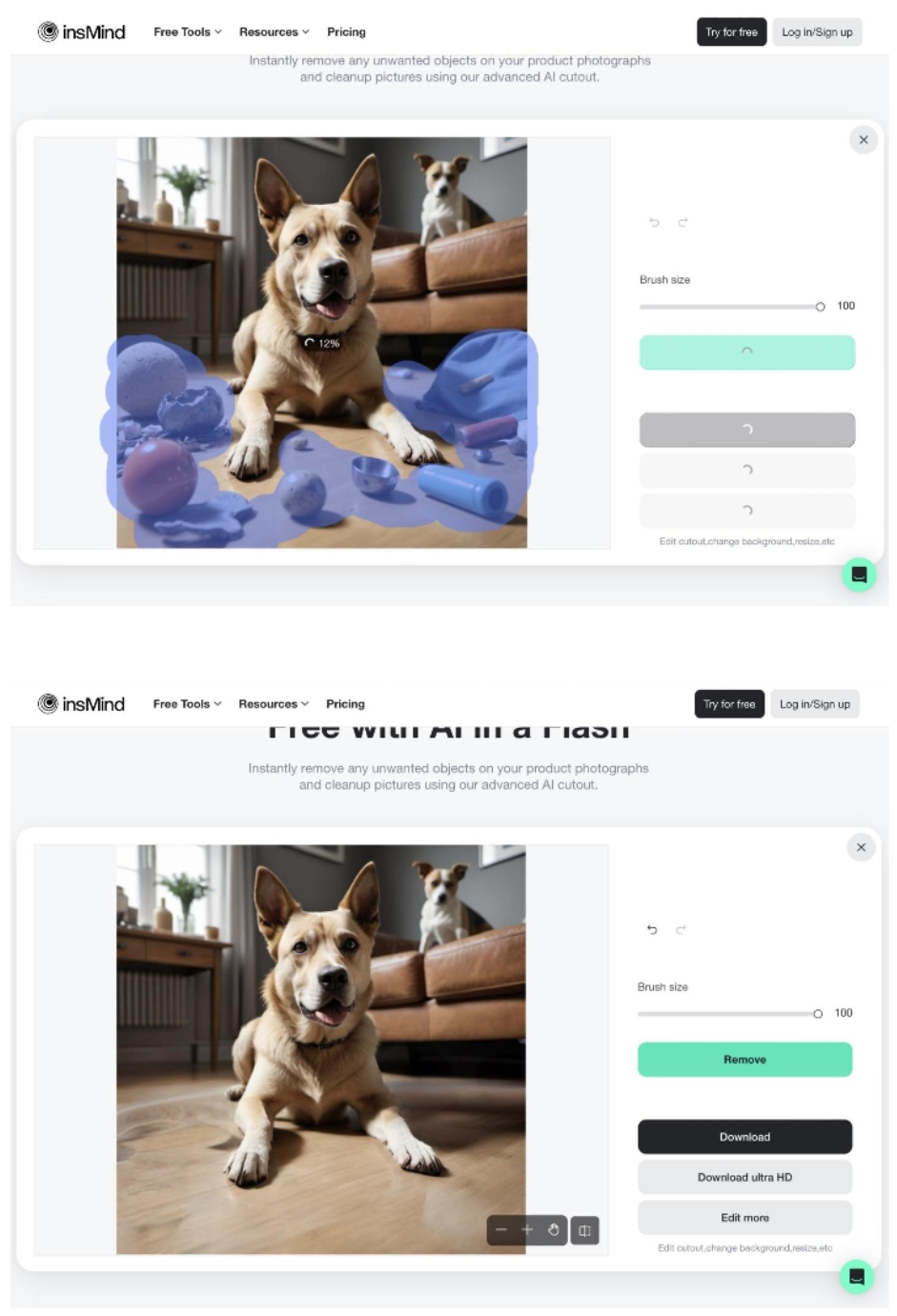
Once you have chosen your desired photo, you will then be directed to this page. Here, you can select the brush size you need depending on how big or how small you need your brush to be to cover the unwanted area. After selecting the brush size, you can go on ahead and brush over the unwanted objects you wish to remove. You may go over these areas as much as you need to achieve that clean look. After brushing on the unwanted objects click the “Remove” button to remove them.
Step 4. Enhance Your Photo
Once you’re satisfied with removing unwanted objects from your photo, you can either save it as is or explore insMind’s variety of editing features. Personalize your image to your liking, and insMind will ensure it looks exactly how you want.
Step 5. Download Your Photo
Once everything looks good, you can now go on ahead and download your photo. Click on the “Download” button seen on the screen and it will be automatically saved to your device.
Using insMind to clean up your pictures is simple and efficient. insMind ensures that your photos look professional and polished, without requiring advanced editing skills. With just these easy steps, you can already achieve these clean and stunning photos. Now that you know these steps, you don’t have to worry about unwanted objects ruining your photos anymore, thanks to insMind!
3.Benefits of Using AI to Clean up Pictures
As we all know, AI has become a great assistance to our everyday tasks, especially in photo editing. Using AI to easily clean up pictures offers numerous benefits making it a valuable tool for both professionals and beginners alike. AI cleanup tools are a total game-changer as it helps users remove unwanted objects in a matter of seconds, in just a few clicks. This promotes productivity and efficiency, making AI a reliable candidate for the quick and on-the-go photo editing touch ups users need.
A clean and polished photo can significantly enhance its visual appeal, making it more engaging and memorable. Whether you’re a photographer, social media influencer, or someone who loves capturing moments, AI cleanup tools can help you achieve flawless images effortlessly.
4.Why insMind is the Best AI to Clean up Pictures
insMind is indeed the best candidate as the best AI tool for cleaning up pictures due to many reasons. One reason, and the most appealing reason is that it is free for everyone to use. This is great especially for users who aren’t capable of spending a fortune to edit their photos. insMind understands that having the luxury of polished and clean looking photos doesn’t have to be expensive. Another reason is that insMind doesn’t want to delay your creativity, which means they offer a swift processing of your photos ensuring you can clean up your photos efficiently and swiftly.
insMind also stands out for their user-friendly interface, making it easy and fast for beginners to navigate. The best part about insMind is that, despite all the features it offers, it doesn’t compromise your photos’ quality. This makes insMind a reliable AI editing tool for all your needs. You don’t need to be a photo editing genius to create stunning photos with insMind. With a bit of creativity and determination, insMind can bring your photos to life effortlessly.
5.Conclusion
Cleaning up your pictures has never been easier, with the help of insMind. insMind is indeed the jack of all trades when it comes to photo editing. From complicated edits to simply removing unwanted objects, insMind ensures you get the photos you desire. Users can attest that insMind caters to everyone, making this AI tool accessible to anyone to achieve the image they wish.
So what are you waiting for? Elevate your photos with insMind now and experience the photo editing difference. Why settle for ordinary and boring photos, when insMind is here to help you create extraordinary ones catered to your preference. Try it now!
